This article gives IT administrators a basic overview of how your users connect to a farmerswife Cloud server: which addresses and ports are used, and how each connection is encrypted.
This applies to clients running farmerswife 7.3 SP2 and above.
Running your own fw Server? See farmerswife On-Premise Server: Ports, Connectivity and Data Flow instead.
TABLE OF CONTENTS
- Overview
- Addresses and ports
- Encryption
- Firewall checklist
- Related articles
1. Overview
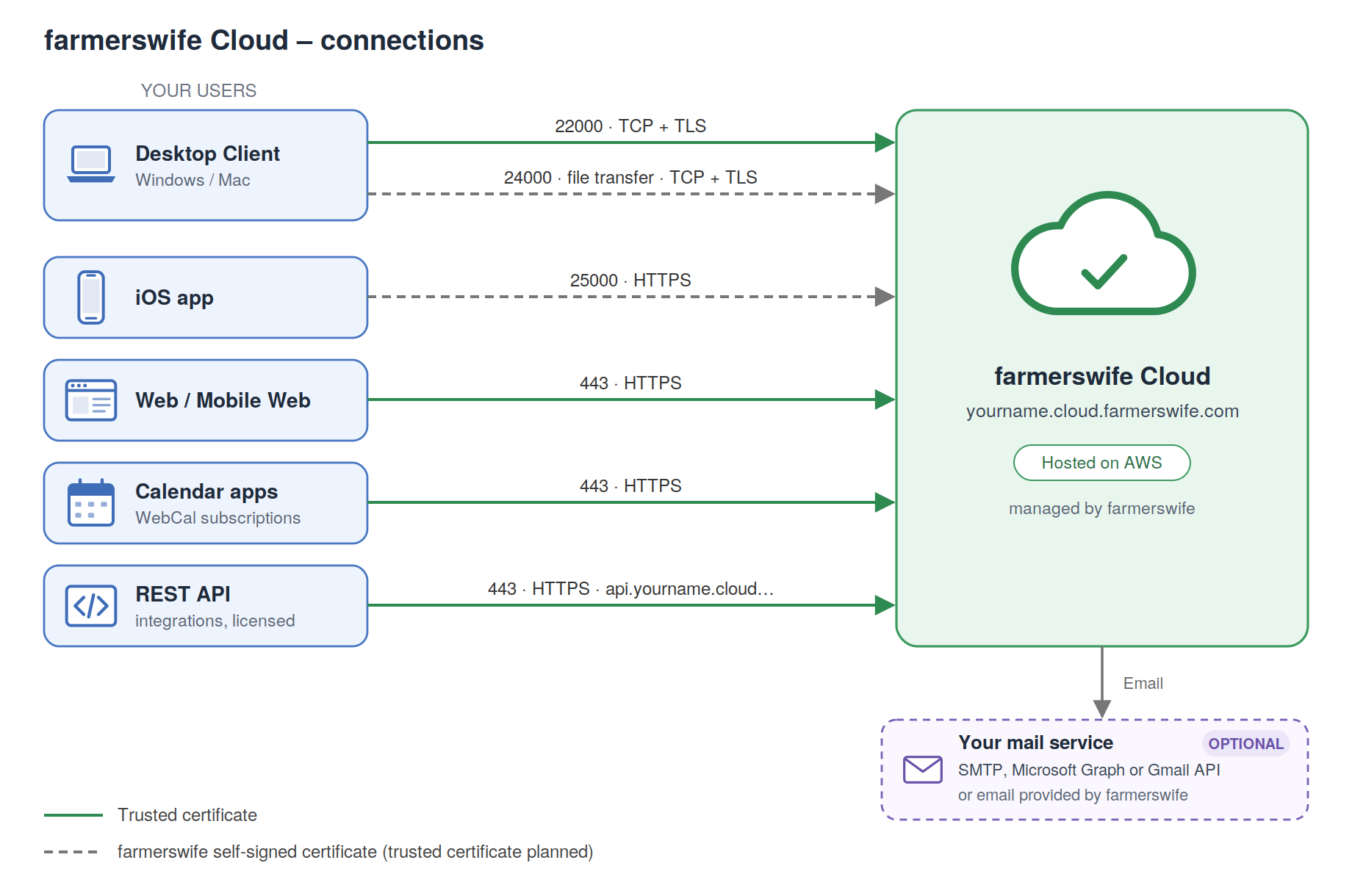
Your farmerswife Cloud server runs on AWS and is managed by farmerswife. All your data lives on that server, and every client connects to it directly over an encrypted connection; nothing needs to be installed or opened on your own servers
2. Addresses and ports
Replace yourname with your farmerswife Cloud name. Your cloud welcome email lists your exact addresses.
| Client | Address | Port | Encryption |
|---|---|---|---|
| Desktop Client | yourname.cloud.farmerswife.com | 22000 | TCP + TLS with a trusted certificate |
| Desktop Client file transfer | yourname.cloud.farmerswife.com | 24000 | TCP + TLS with the farmerswife self-signed certificate |
| iOS app | yourname.cloud.farmerswife.com | 25000 | HTTPS (TLS 1.2) with the farmerswife self-signed certificate |
| Web Client | https://yourname.cloud.farmerswife.com/ | 443 | HTTPS with a trusted certificate |
| Mobile Web Client | https://yourname.cloud.farmerswife.com/mobile/ | 443 | HTTPS with a trusted certificate |
| WebCal | https://yourname.cloud.farmerswife.com/webcal/index.html | 443 | HTTPS with a trusted certificate |
| REST API (licensed only) | https://api.yourname.cloud.farmerswife.com/api/v1 | 443 | HTTPS with a trusted certificate |
The Desktop Client uses two ports: 22000 for logging in and working, and 24000 for automatic client upgrades and file uploads. Both are required.
3. Encryption
- Desktop Client (22000) connects over SSL using a trusted, publicly issued certificate – the same level of trust as an HTTPS website – so the client can verify it is talking to your genuine farmerswife Cloud server.
- Web Client, Mobile Web Client, WebCal and REST API use HTTPS on port 443 with a trusted certificate.
- File transfer (24000) and the iOS app (25000) connects over TCP with TLS with the farmerswife self-signed certificate. These will move to trusted certificates in a later release.
- Data is encrypted at rest.
4. Firewall checklist
Allow outbound connections from your users' network to yourname.cloud.farmerswife.com on:
- 22000 and 24000 TCP and TLS – Desktop Clients
- 25000 HTTPS – iOS app
- 443 HTTPS – Web Client, Mobile Web Client and WebCal
If you use the REST API, also allow 443 HTTPS o api.yourname.cloud.farmerswife.com.
If your network inspects or intercepts SSL traffic, make sure these connections are allowed through unmodified.
5. Email
Your farmerswife Cloud server sends email such as notifications, reports and invoices. You can either:
- use email provided by farmerswife as part of the cloud service – no mail setup is needed on your side. See farmerswife Email Delivery (AWS SES), or
- send through your own mail service, connected via SMTP, Microsoft Graph (Microsoft 365) or the Gmail API (Google Workspace). See Outgoing Mail Configuration. If you use SMTP and your mail server only accepts mail from known senders, ask Support for the IP address to whitelist.
6. Related articles
Was this article helpful?
That’s Great!
Thank you for your feedback
Sorry! We couldn't be helpful
Thank you for your feedback
Feedback sent
We appreciate your effort and will try to fix the article