TABLE OF CONTENTS
- 1. Overview
- 2. How this differs from the previous (Pull) integration
- 3. Before you start: prerequisites
- 4. Implementation steps
- 5. Using the integration day to day
- 6. Questions & Answers (non-technical)
1. Overview
1.1 What is the SCIM integration?
The farmerswife SCIM integration connects Microsoft Entra ID with farmerswife, so that farmerswife user
accounts are created, updated, and deactivated automatically as people join, change roles, or
leave your organization.
[SCIM stands for System for Cross-domain Identity Management. It is an open industry standard for exchanging user identity information between an identity provider and the applications it manages.]
1.2 What it does
Once configured, the integration ensures:
• Provision: creates a farmerswife user automatically when a person (or group) is assigned
to the farmerswife application in Entra ID.
• Update: keeps user details (name, email, username, and other mapped fields)
synchronized whenever they change in Entra ID.
• Deprovision: deactivates the farmerswife user automatically when the person leaves the
organization or is unassigned from the application.
• Group sync (optional): can synchronize group membership where supported, to help
drive roles or permissions.
1.3 What it is expected to achieve
The objective of the integration is to make Entra ID the single source of truth for who has access
to farmerswife. In practice this means:
• Eliminating manual creation and maintenance of farmerswife users.
• Ensuring farmerswife always reflects the current, authoritative state of your workforce.
• Improving security and compliance when someone leaves, their farmerswife access is
removed promptly and automatically, with no dependency on a manual checklist.
• Providing a standards-based, future-proof integration that is not tied to a single vendor.
Important: provisioning is not the same as sign-in. SCIM controls which accounts exist in farmerswife and what their details are. It does not control how users log in. Authentication (how a user proves who they are) is handled separately by Single Sign-On (SSO / OIDC). SCIM and SSO are complementary: SCIM makes sure the account is there, SSO lets the person log into it. You can run SCIM with or without SSO.
2. How this differs from the previous (Pull) integration
The previous farmerswife directory integration used a pull model: farmerswife reached out to
the directory on a schedule and pulled in a list of users to import and update. The new
integration reverses this: with SCIM, Entra ID pushes each change to farmerswife as it
happens.
2.1 The previous Pull model
• Initiated by farmerswife, farmerswife connected outward to the directory and requested user data.
• Scheduled / batch: changes only appeared after the next sync cycle ran, not when they were made.
• Primarily one-directional import: focused on bringing users in; leaver handling and deactivation were often limited or manual.
• Required directory access: farmerswife typically needed read credentials or a directory
connection to query users.
2.2 The new SCIM (Push) model
• Initiated by Entra ID: the identity provider calls a secure farmerswife endpoint whenever something changes.
• Near real-time: changes flow through automatically on Entra's provisioning cycle, and a single user can be pushed immediately with "Provision on demand." (Note: a single-user push carries the person's details only, group-based profile mapping requires a group provision or a full cycle)
• Full lifecycle: create, update, and deactivate are all handled, including automatic deprovisioning of leavers.
• No directory credentials stored in farmerswife: farmerswife issues a token that Entra uses to authenticate; farmerswife never holds your directory admin login.
• Standards-based: works with any SCIM 2.0 compliant identity provider.
3. Before you start: prerequisites
3.1 On the farmerswife side
• farmerswife Server version 7.4
• A bearer/secret token generated by farmerswife, used by Entra to authenticate.
• User groups should be correctly set to match Entra groups.
• The farmerswife server must be reachable from Entra ID over HTTPS (a public or otherwise routable endpoint, with a valid TLS certificate).
3.2 On the Microsoft Entra side
• A Microsoft Entra ID tenant with a license that supports automatic user provisioning for enterprise applications.
• An administrator with sufficient rights, typically Application Administrator, Cloud Application Administrator, or Global Administrator.
• The list of users and/or groups that should have farmerswife access.
• Agreement on which Entra attribute is the unique matching key (commonly userPrincipalName, mail).
4. Implementation steps
First enable and configure the endpoint in farmerswife, then create and point an enterprise application to it in Entra ID.
4.1 Path A: Configure farmerswife from Server
1. In the farmerswife Server administration, open Server App > Users and enable Microsoft Entra ID - SCIM (Push provisioning)
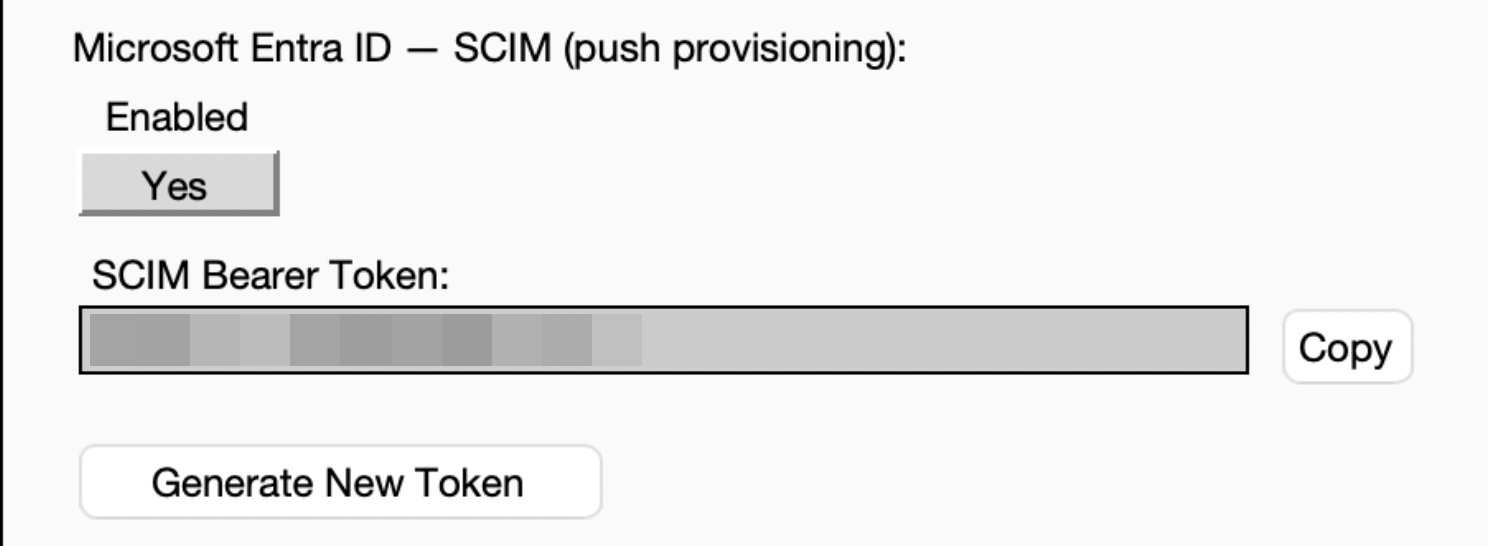
2. Generate the bearer (secret) token. Copy it somewhere secure now.
Store the token it in a secure secrets manager, share it only through a secure channel, and rotate it if it is ever exposed.
3. Go to Microsoft Entra ID Shared Mappings and Create User groups to map correctly the users coming from Entra to Farmerswife.
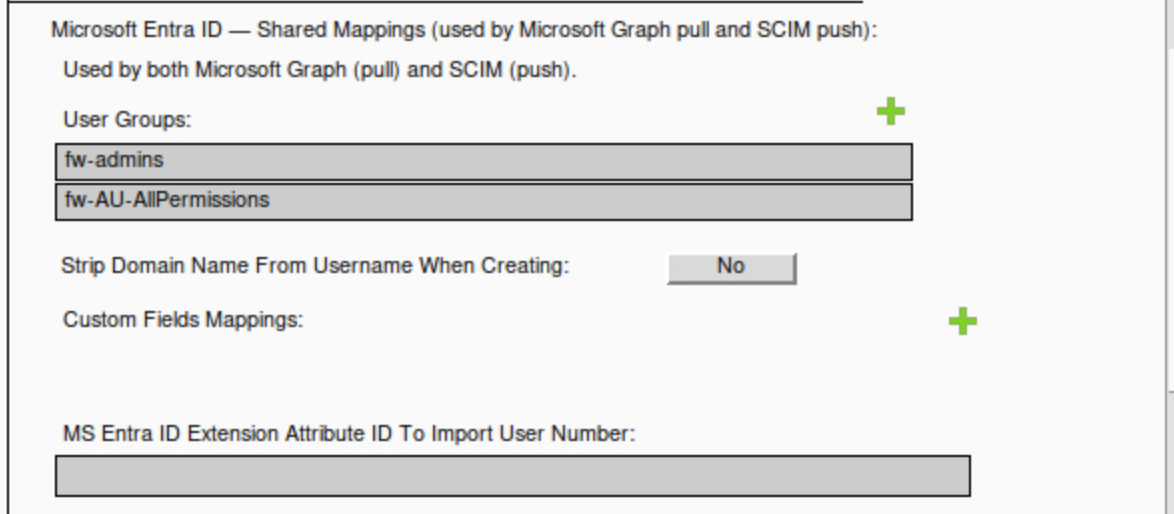
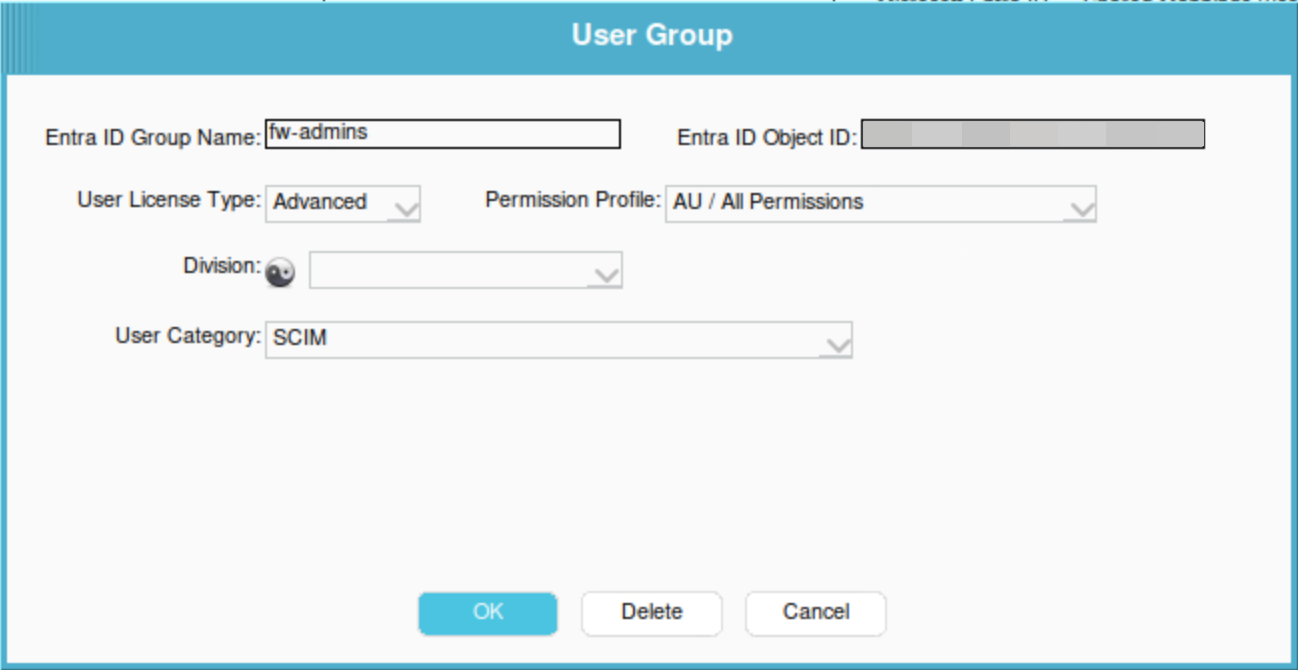
4. The Entra ID Group Name and Entra ID Object ID come from the respective groups you have in Entra that you want pushed into farmerswife.
The license type, permission profile, Division, and User Category are values stored in farmerswife.
This row is the farmerswife-side Groups configuration that links an Entra group to what it should mean in farmerswife. Entra only provides the group identity (name + Object ID) and its members; farmerswife decides, per group, which license type, permission profile, Division, and User Category the incoming users should get. Without this mapping, farmerswife wouldn't know how to classify the users Entra pushes.
4.1 Path B: Configure farmerswife from Client
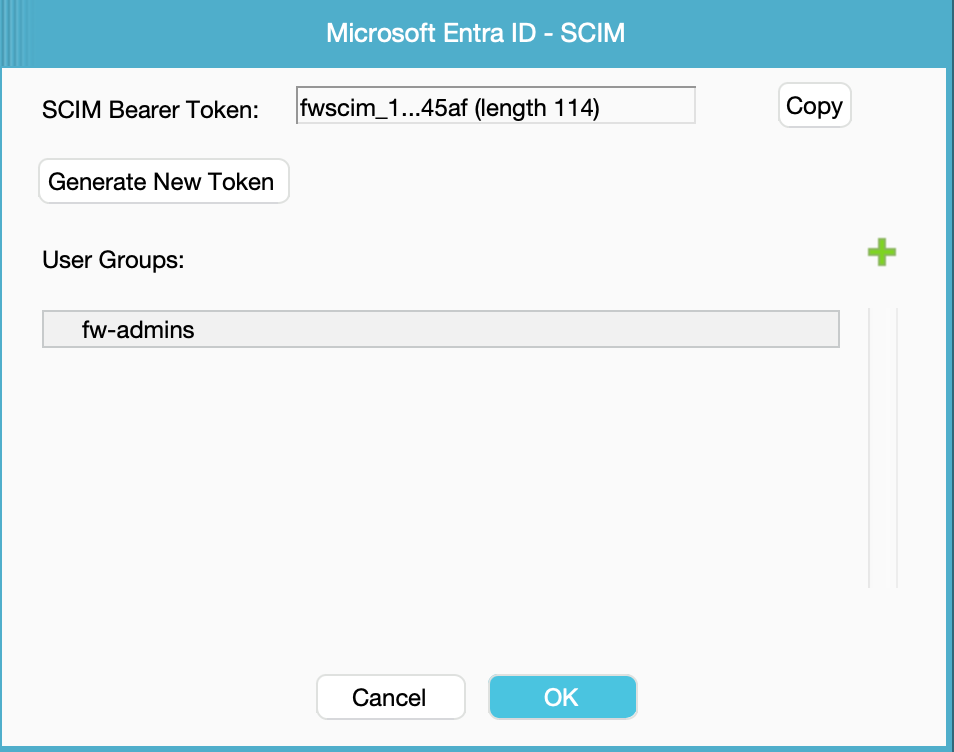
1. In the farmerswife Client application open the Toolbox > Settings > Server Setup and enable SCIM Provisioning
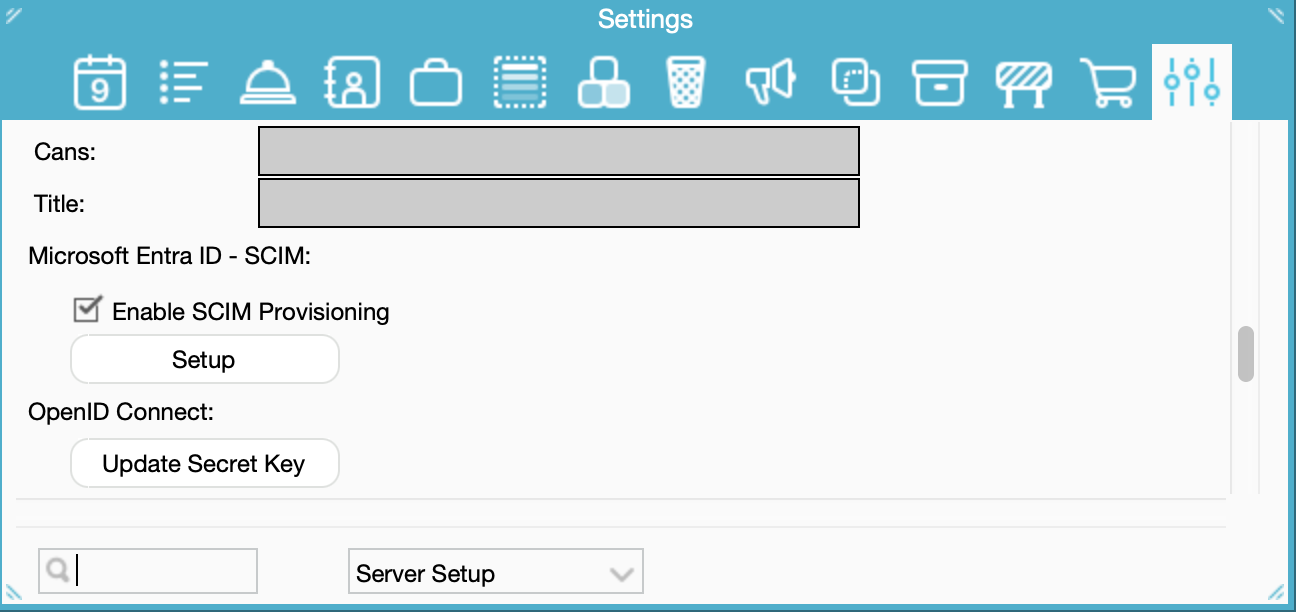
2.Click at Setup, A new window will appear where you can configure the groups, generate and copy the token
4.2 Part B: Configure Microsoft Entra ID
1. Sign in to the Microsoft Entra admin center (entra.microsoft.com) as an administrator, and go to Entra ID → Enterprise Apps.
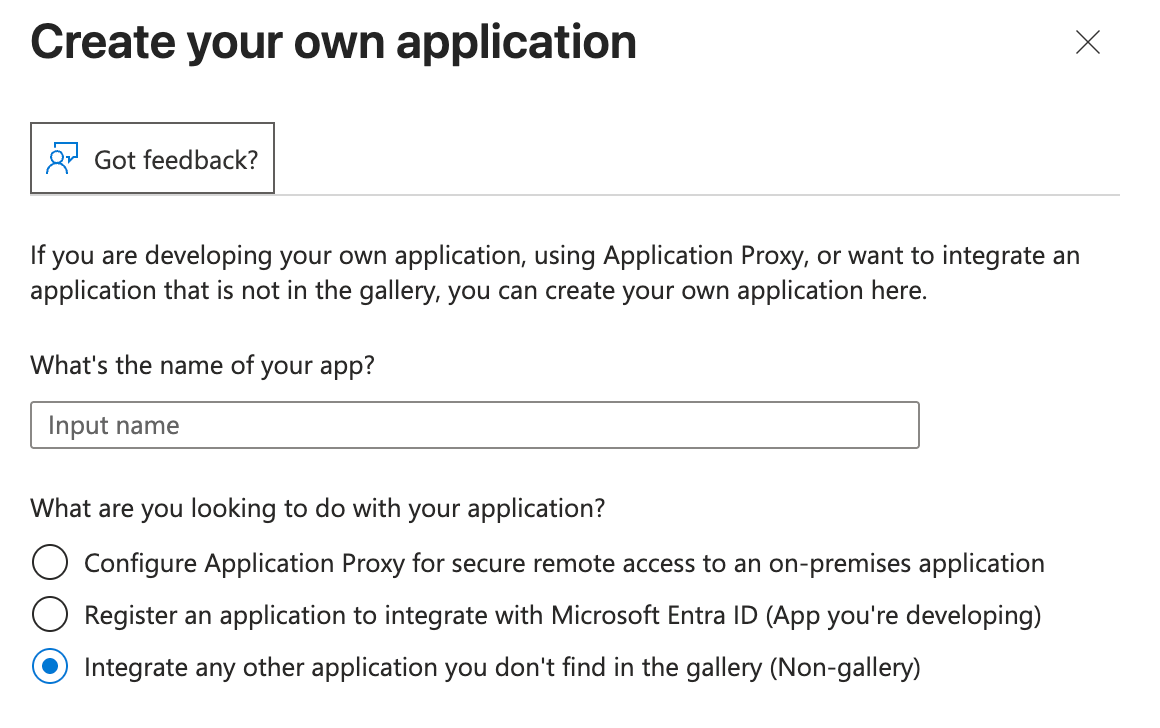
2. Select New application → Create your own application,
3. Give it a name, choose the “non-gallery” / integrate any other application you don't find in the gallery (Non-gallery)
4. Open the new application > Provisioning > New configuration.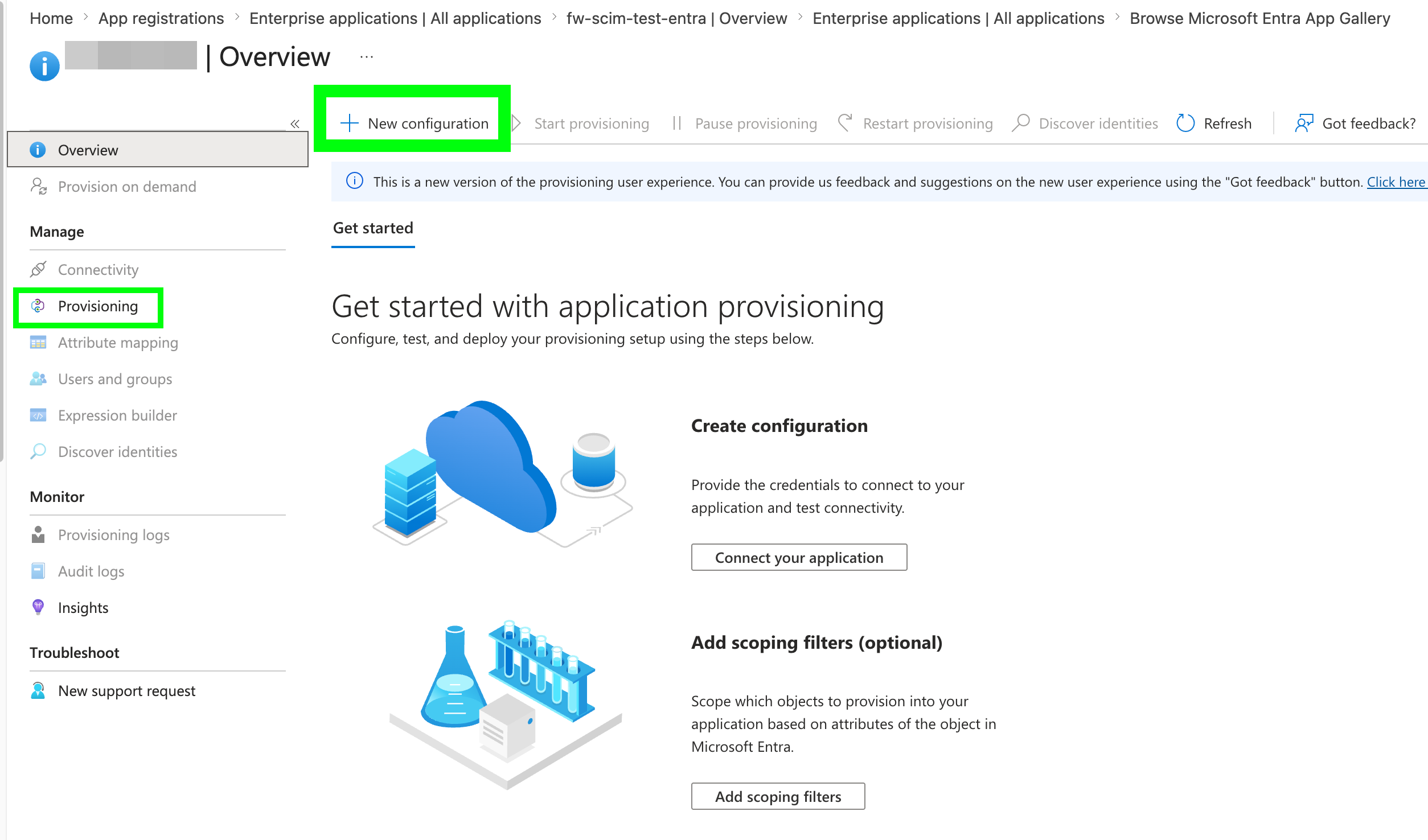
4.Select as authentication method: Bearer authentication
In Tenant URL, enter your SCIM Base url (https://<server>/api/v1/scim/v2)
and in Secret Token, paste the token you copied from Farmerswife server.
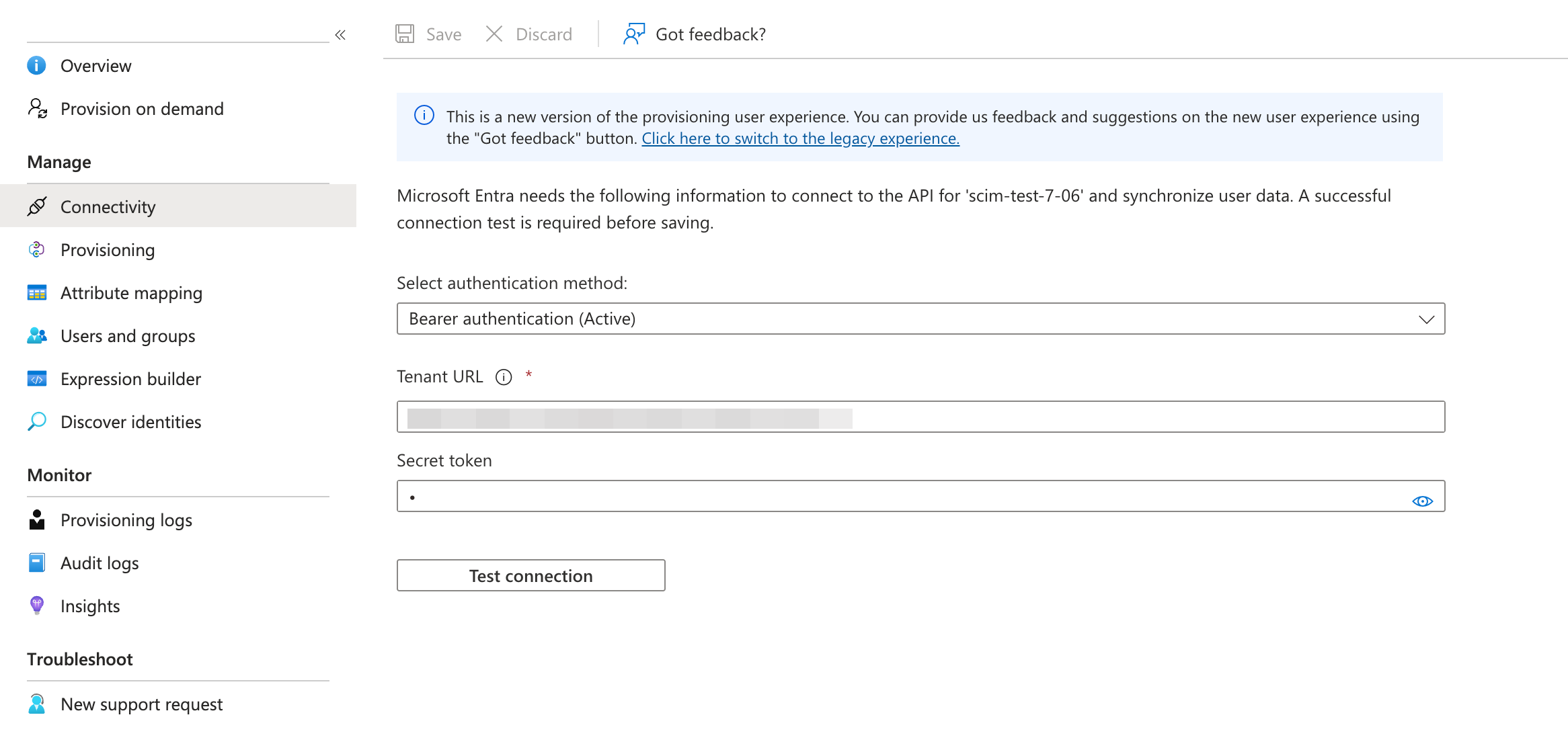
5. Click Test Connection. Entra will attempt to reach the farmerswife endpoint; resolve any
error shown before continuing, then save and create.
Don't forget to save
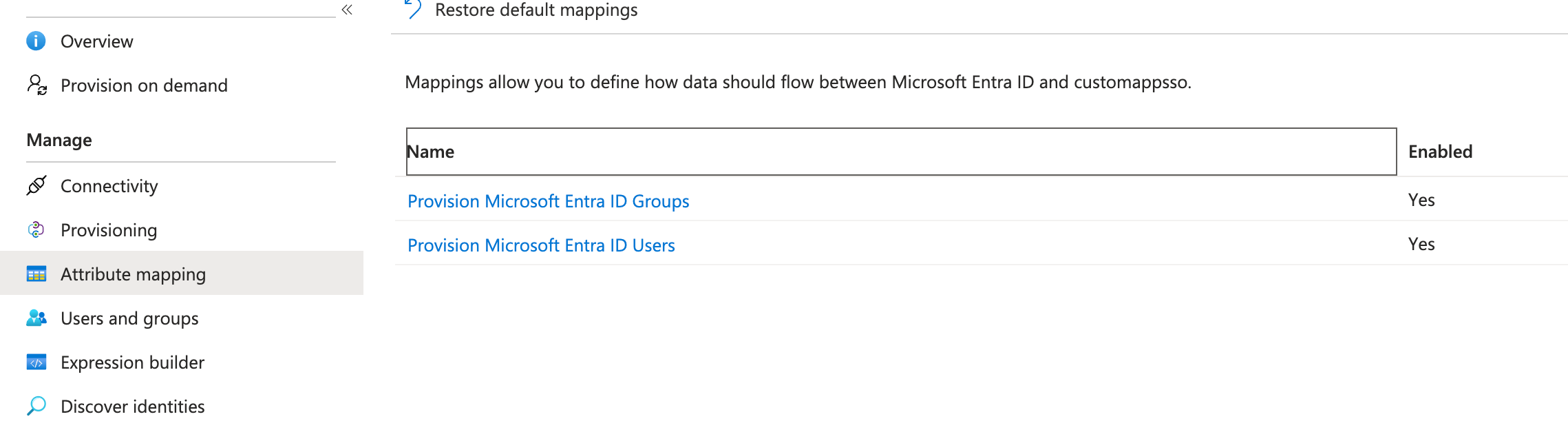
6. Go to Attribute Mapping and review the Provision Microsoft Entra ID Users mapping (and
Groups, if you use group sync).
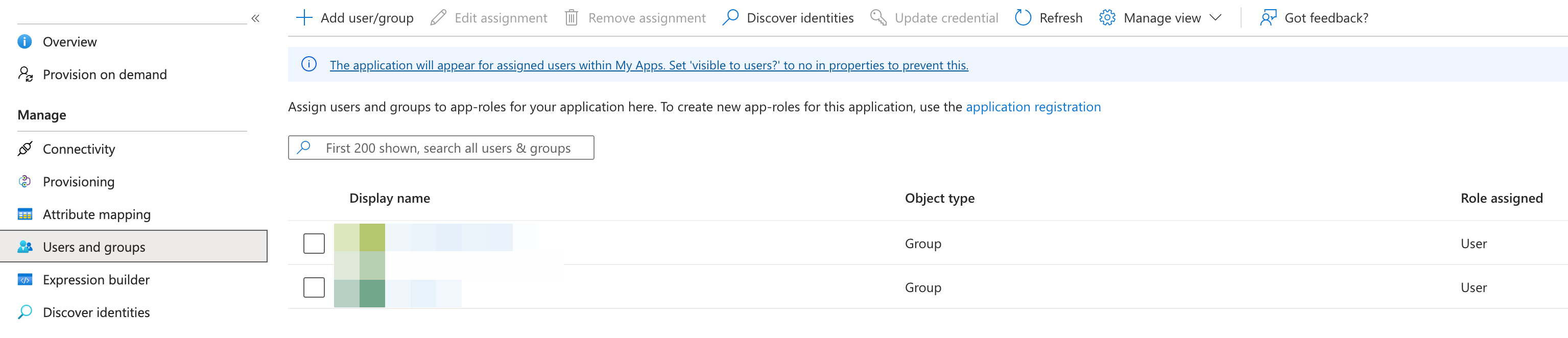
7. Go to Users and groups and assign the people (and/or groups) who should have
access (“Add user/group → select → Assign”). Under Settings → Scope, choose “Sync only assigned users and groups.”
8. Quick Actions: Provision on demand: run it on a group to confirm its members appear in farmerswife with the correct license, profile and Division. This is instant.
⚠️ Provisioning a single user on demand only tests basic details, the user is created as a Task User with no profile mapping (see the note in Section 2.2). To get the correct farmerswife profile, always provision the group.
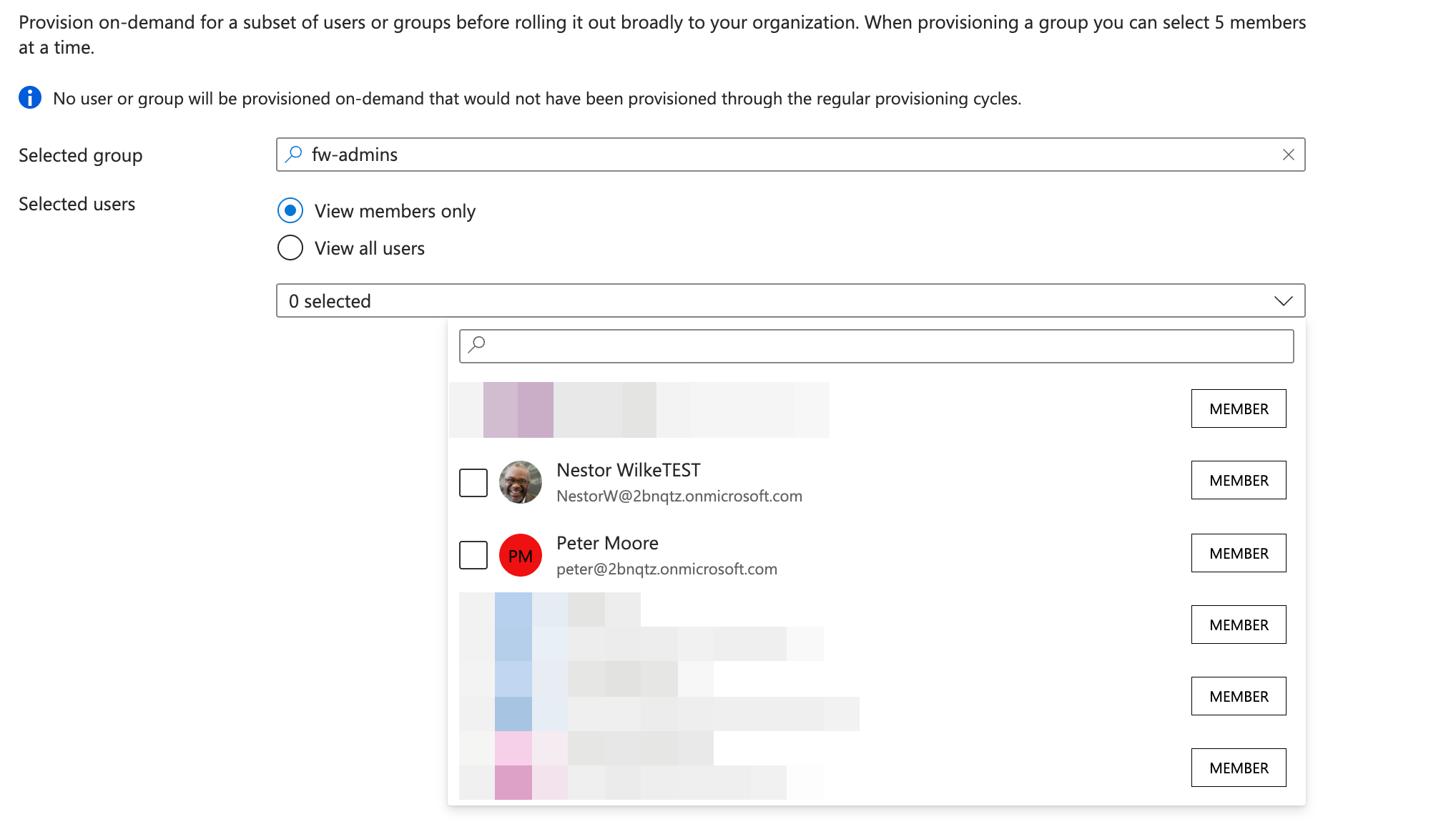
You will need to keep running farmerswife server, You can do it being loged in on the client, after the push, you will need to log out the client and log in again, you'll see the users updated.
9. You can instead of provisionning by demand, start provissioning all the groups defined at Users and Groups at once, this will take 30-40 minutes, the farmerswife server needs to be running.
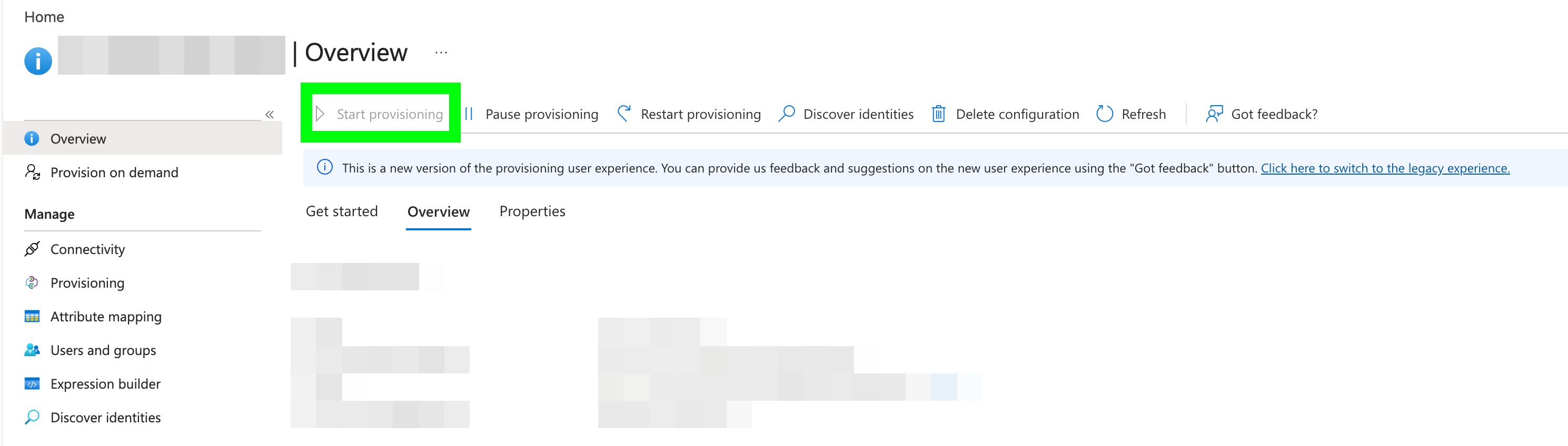
Entra runs an initial cycle (this can take from ~20 minutes up to several hours depending on volume), then syncs incrementally roughly every 40 minutes.
Important: how a user gets their farmerswife profile (Division, License type, Permission profile).
A user's farmerswife role comes from the group mapping, and Entra only sends group membership during a group provision or a full provisioning cycle.
So provisioning a group (or running a full cycle) creates the user with the correct profile, this is the only way to get it right. Provisioning a single user on demand sends only that person's basic details, with no group information, so farmerswife can't tell which group they belong to and the user is created as a basic Task User (this is normal Entra behaviour, not a farmerswife issue).

If the person already exists in farmerswife, a single-user push only refreshes their basic details and never changes their existing license or profile.

Takeaway: to assign the correct profile, always provision the group; use single-user on-demand only for quick detail updates.
TIP - If the provisioning cycle doesn't update changes correctly

If you notice that the automatic provisioning cycle didn't push the changes correctly (Or you simply don't want to wait for the -40 minutes cycle), you can always force the push manually using the provision on Deman in Entra,There are 2 ways to do this:

From the group > by selecting the member you want to provision
From the user > By searching from them via their UPN, name or email

In both cases the change is applied instantly in farmerswife, without waiting for the next cycle.

Note: pushing from the user updates their details instantly, but it does not assign the farmerswife profile (license / Division / permission profile). For that, push from the group.
5. Using the integration day to day
Once provisioning is On, most administration happens in Entra ID rather than in farmerswife.
The common scenarios:
5.1 A new person joins
1. Assign the person (or a group they belong to) to the farmerswife enterprise application in Entra.
2. On the next cycle, or immediately by provisioning the group on demand — farmerswife creates the user with the correct profile. (Provisioning the single user on demand creates them as a Task User without the group profile, see Section 2.2.)
5.2 A person’s details change
Update the person in Entra ID (name, email, etc.). The change flows to farmerswife on the next
sync for any field included in the attribute mapping. Fields not in the mapping are not affected.
5.3 A person leaves or loses access
Unassign the person from the application (or disable/delete their Entra account) Or removed from a synced group. Entra signals deprovisioning by sending an update that sets active = false.
Farmerswife then deactivates the user rather than hard-deleting them, so history and records are preserved.
5.4 Monitoring
• Use the Entra Provisioning logs (in the application) to see each create/update/disable
and troubleshoot failures.
• Check farmerswife logs for the receiving side of each request.
6. Questions & Answers (non-technical)
Will this change how my team logs in to farmerswife?
No. SCIM only manages whether accounts exist and keeps their details current. How people log
in is handled separately (by your password or Single Sign-On setup). SCIM and login work
alongside each other.
Do I still have to create users in farmerswife by hand?
No, that’s the point. Once it’s on, assigning someone to farmerswife in Entra ID creates their
account automatically. You manage people in one place instead of two.
What happens when someone leaves the company?
When they’re removed or disabled in Entra ID, farmerswife deactivates their account
automatically, so they lose access promptly without anyone remembering to do it manually.
Does it delete the person, or just switch them off?
By default it deactivates (switches off) the account rather than deleting it, so their past work,
bookings, and history are preserved. The exact handling is being confirmed.
How quickly do changes appear in farmerswife?
Automatic syncs run on a regular cycle (typically about every 40 minutes). If you need a specific
change immediately, an administrator can push that single person on demand.
Is this the same as Single Sign-On (SSO)?
No. SSO is about logging in; SCIM is about which accounts exist and their details. They’re
complementary, many organizations use both, but you can use SCIM on its own.
How is this different from the old integration we had?
The old one had farmerswife periodically reach out and pull a list of users. The new one has
Entra ID push each change as it happens, covers leavers automatically, and is built on an open
standard. See Section 2 for the full comparison.
What happens to people already in farmerswife when we turn it on?
Existing users are matched to their Entra identity using the agreed matching field (e.g. email),
so they’re linked rather than duplicated. It’s worth a quick data check before going live.
Can we still manage a few users manually?
Generally, accounts that come from Entra are managed by Entra. Whether purely local (non-
Entra) accounts can coexist depends on the final design.
What if the connection between Entra and farmerswife breaks?
Entra retries failed syncs and records them in its provisioning logs, so changes catch up once
the connection is restored. Nothing is silently lost; an administrator can review and re-run.
Is our data safe? What information is shared?
Only the user fields needed to manage accounts (name, email, username, active status, and
similar) are sent, over an encrypted HTTPS connection, authenticated by a secret token. No
passwords are shared.
Who needs to set this up?
Two roles: a farmerswife administrator (to enable the endpoint and provide the URL and token)
and a Microsoft Entra administrator (to create the application and turn on provisioning). It’s
usually a one-time setup.
What happens to a person’s bookings or projects if they leave?
Deactivating a user doesn’t erase their associated records by default. Exactly how farmerswife
presents bookings or assignments tied to a deactivated user is being confirmed.
Was this article helpful?
That’s Great!
Thank you for your feedback
Sorry! We couldn't be helpful
Thank you for your feedback
Feedback sent
We appreciate your effort and will try to fix the article